
IN THE KITCHEN
A recipe for four.
A table for six.
You ask“Scale 250 from 4 servings to 6 servings.”
The calculation375 in the same units.
Scale quantities without scaling cooking time.
A voice-first assistant for Windows and Android. Ask, organise, calculate and explore—with a typed alternative whenever you prefer.
Discover how it works →Watch the interface film ↗Two editions. One people-first ambition.
Choose what works for you today.
Device resources and setup matter.
Windows 1.33 · Android 1.36
Ask a question. Organise your day. Take the next step. BRIGGS brings voice, local AI and practical tools together—without making speech the only way in.
Windows and Android previews are in active development. Capabilities differ by device, model and permissions; important answers and actions still deserve your review.
A date you need to check. A recipe that needs adjusting. A bill to split. BRIGGS brings small, useful tools into the same place as conversation.
IN THE KITCHEN
You ask“Scale 250 from 4 servings to 6 servings.”
The calculation375 in the same units.
Scale quantities without scaling cooking time.
OUT WITH FRIENDS
You ask“Split 100 between 3 people.”
The calculation33.34 + 33.33 + 33.33
Two-decimal allocation. No payment is made.
ONE LESS THING TO CHECK
You ask“Weekday of 10/06/2007.”
The calculationSunday · 10 June 2007
British date order: day, month, year.
Illustrative examples of supported 1.33 local tools, not a live demo. Use numeric amounts and the shown request patterns. Speech recognition can still mishear a request.
Technology should meet you where you are. Meet BRIGGS: conversation and everyday tools, with you in control.
Illustrative animation · not live AI activity. Microphone demo reacts only to loudness in your browser; it does not record or upload audio.
Step inside BRIGGS. Follow the connections that bring everyday help closer.
“Help me plan my day.”
One request can lead to the next: voice, local AI and everyday tools, working together.
Planning, conversation and music controls, side by side.
BRIGGS is still in development. Follow along, or read what is and isn’t ready yet.
Scroll to follow the connections
Skip the animationA visual story of BRIGGS—not live AI activity. These are illustrative requests and concept panels, not a claim that one request runs every tool.
Say Kev or Kevin with the male profile, or Lisa with the female profile. Prefer to type? That remains your choice. Listening needs microphone permission, and recognition can make mistakes.
Choose a shorter or simpler answer, take a longer pause, and review supported actions before proceeding. You remain in control.
The sphere is the visual centre. Behind it, BRIGGS brings input, local tools and review controls into one place. Here is the idea in plain English.
Speak through an enabled microphone, or type. Listening preferences let you choose a more comfortable pace in supported flows.
A supported calculation can use a direct local tool. Open-ended questions can use a configured local AI model.
Supported sensitive actions keep their review and permission steps. A suggested message is not permission to send it.
Review the reply, hear it aloud, or request a shorter or simpler explanation. Stop the response whenever you need to.
A simplified explanation, not a live system diagram. Not every request uses every step. Explore the full guide →
What is in the current Windows and Android previews—not a promise of identical features on every device.
Voice and typed input, selectable male and female voices, speaking pace and a reversible warm-delivery option.
Warm delivery changes pacing; it is not an emotion-trained voice model.
Local task and shopping lists, guided checklists and supported reminder workflows.
Planner dates are labels, not alarms. Checklist steps are not automatically executed.
Optional local AI, quick calculations, answer review and options to repeat or simplify ordinary answers.
Answers can be wrong. Source retrieval and citation checks do not guarantee accuracy.
Supported media-session controls and opt-in Android notification reading and approved reply workflows.
App support and permissions vary. Message sending retains confirmation and unlock safeguards.
Physical-device, headset, screen-reader and disabled-participant testing still have work outstanding. A polished interface does not mean every workflow is ready for every person.
The same ambition on Windows and Android: make useful help easier to reach. Each edition works within its device’s capabilities and permissions.
Bring typed or spoken questions, local AI and practical tools into a desktop workspace.
NVDA requires a separate installation. Hermes is a bounded notes workflow, not unrestricted computer control.
Use voice or text, set a comfortable listening pace and keep everyday tools within reach.
Messaging and music support vary by app. Replies retain confirmation and unlock safeguards; background behaviour depends on Android.
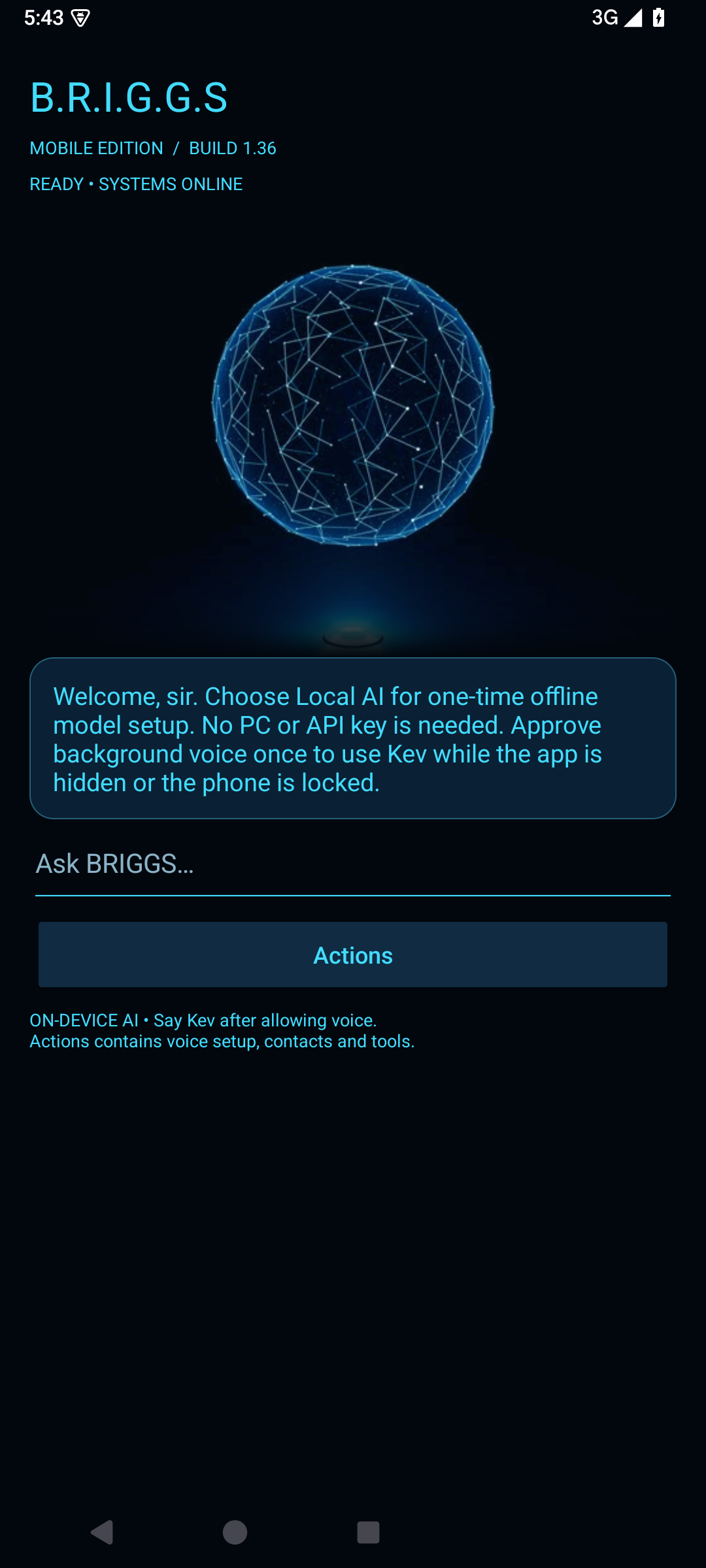
The interface should help you understand what is happening—not become another thing to learn. BRIGGS keeps conversation at the centre and puts additional controls within reach.
Read written answers and use typed input when speaking is inconvenient, tiring or simply not your preference.
Android’s expandable Actions menu brings together voice settings, accessibility preferences, everyday tools and the control search.
Use larger text and reduced motion. Set your voice and speaking pace without making the animated interface a requirement.
Not every useful answer needs a trip to the cloud.
BRIGGS can run supported AI models and everyday tools on your own device. Simple calculations can take a direct local route instead of waiting for a model to generate an answer.
That does not make the whole application offline. Online features contact their services, and device memory affects which models can run. Important answers still need your judgement.
Read how data and online features are handled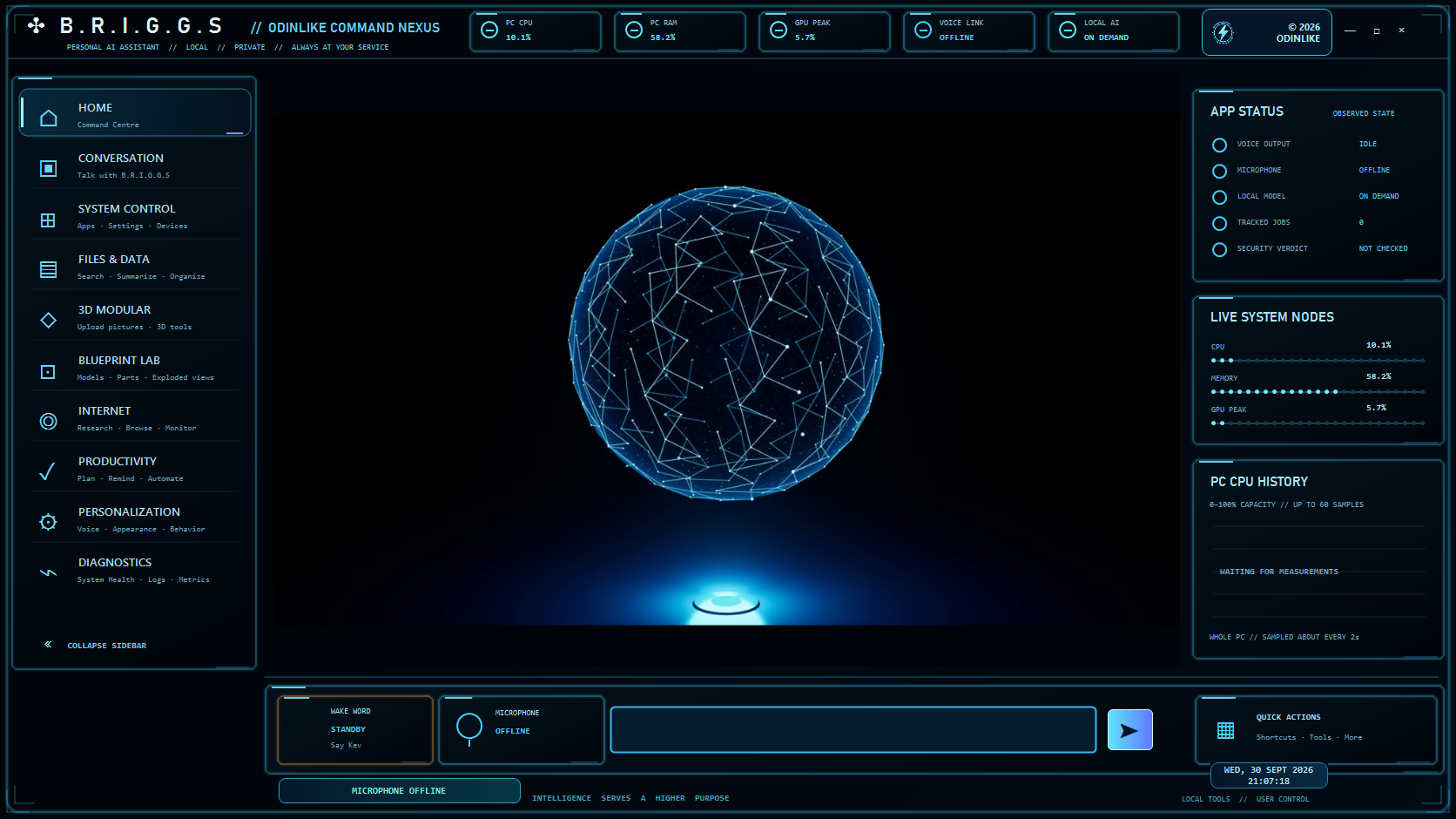
A familiar place for conversation, controls and an at-a-glance view of your computer.

Joseph Kevin Briggs started this project with his disabled mum in mind—and the everyday barriers that can make technology harder than it needs to be.
The ambition is broader independence, shaped by the people who will actually use it.
Explore accessibilityExplore the possible subscription structure. Prices, allowances and launch timing are not confirmed.
Future pricingBetter access, clearer evidence and more dependable everyday help are the direction—not completed claims.
Our visionClear answers before you decide whether BRIGGS is for you.
Not yet. Windows 1.33 and Android 1.36 are development previews. Automated and emulator checks help find problems, but wider physical-device testing and feedback from disabled users remain important work ahead.
No. Typed input remains an option. You can choose how you interact, change speaking pace and use supported listening settings. Voice recognition is helpful, but it is not perfect.
Local models and local tools run on the device. Some features use online services, and local settings or history may be stored. The terms explain these distinctions; “local AI” should not be read as “nothing is ever stored or sent”.
No. Available memory, processor performance, the selected model and operating-system restrictions all matter. Low-end hardware, battery use and long sessions still need broader testing.
Future pricing is not confirmed. The funding page explains a proposed £80,000 development campaign, but its payment service is not connected and contributions are not open. There is no purchase or investment offer on these pages.
See the funding planThe proposed £80,000 campaign would support development, voice reliability, accessibility feedback and real-device testing.
Explore the funding planFunding is not open yet. No payments are being accepted.
A stronger foundation for the next chapter.
Tell Joseph what you want to do, what gets in the way and which device you use. You do not need to share private messages or medical details.